Learn
AI Rendering vs Traditional Rendering
Two fundamentally different ways to produce a photorealistic image from a 3D model. Here is what separates them — and when each is the right choice for your workflow.
By Joshua KenyonReviewed 26 July 2026Traditional rendering computes an image from scene geometry, materials, cameras and lights using rasterisation, ray tracing or both. Generative AI rendering instead synthesises an image from learned visual patterns, guided by a model view and other instructions. The outputs can look similar, but the processes and their reliability are different.
Understanding which approach fits which situation is the most practical knowledge an architect can have before choosing a rendering workflow in 2026.
How traditional rendering works
Physically based renderers trace light paths through a scene and evaluate camera, material and lighting settings. This gives the artist explicit control over reflections, indirect illumination and other optical effects, but the result is still a simulation whose quality depends on scene data and render settings.
Tools such as V-Ray, Lumion, D5 Render and Enscape generally require a prepared 3D scene: materials, cameras, lighting and any placeable assets. Time to a finished image varies widely with the application, scene complexity, output settings, hardware and how much setup is already complete.
How AI rendering works
Many current image generators use a diffusion process that iteratively turns noise or a latent representation into an image. Text, a model viewport, edges, depth or reference images can guide that process. The model synthesises a plausible image rather than calculating a physically simulated scene.
Structural conditioning methods such as ControlNet can help guide diffusion models with edges, depth or segmentation, although each commercial provider uses its own pipeline. Maquete’s typical still completes in about 30 seconds in the cloud. Results remain probabilistic and should be checked against the source model.
A real AI-rendering input and output
This pair shows the practical AI workflow: a SketchUp viewport becomes a presentation image without building a separate ray-traced scene. It is not a visual test against V-Ray, Lumion or D5.
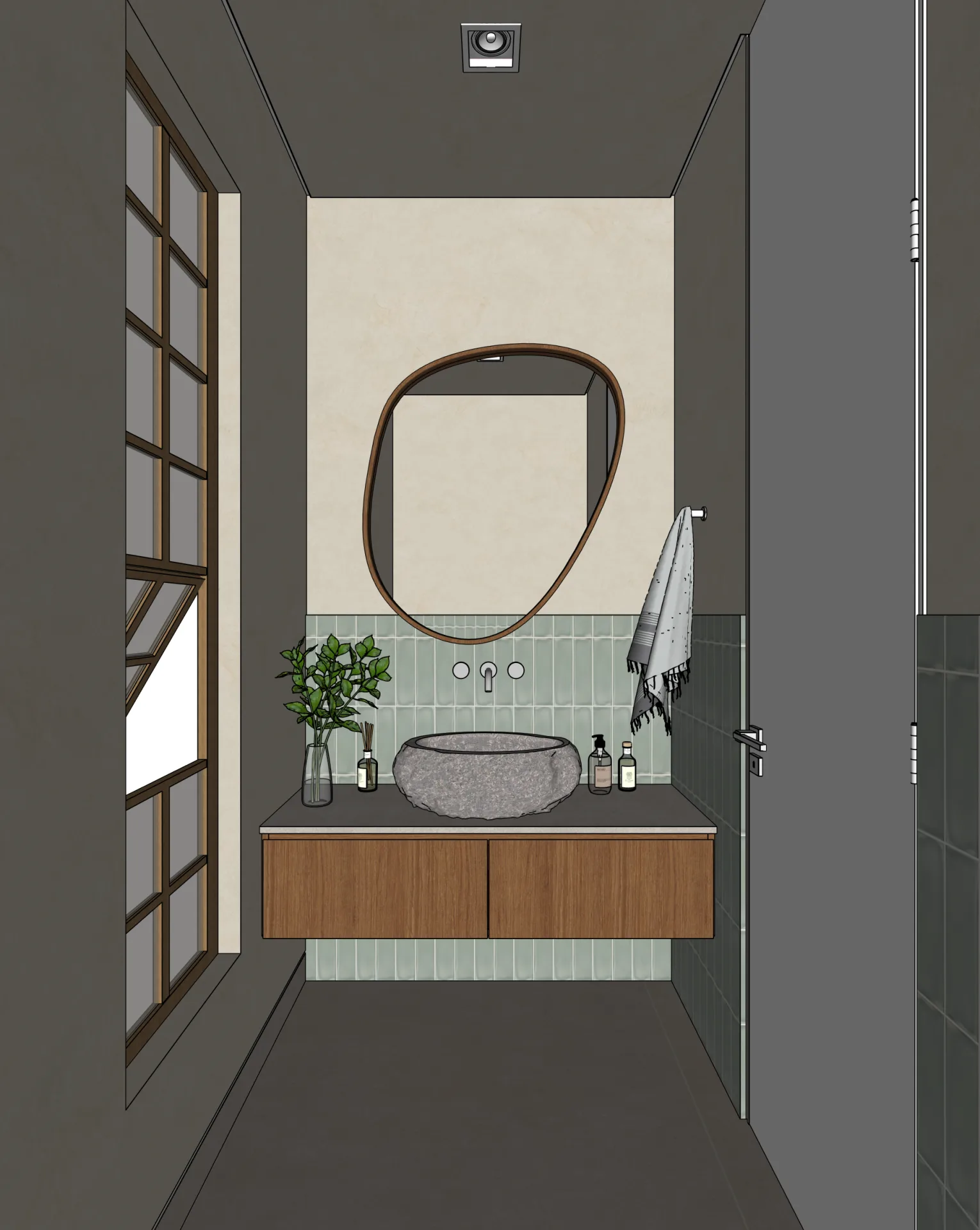
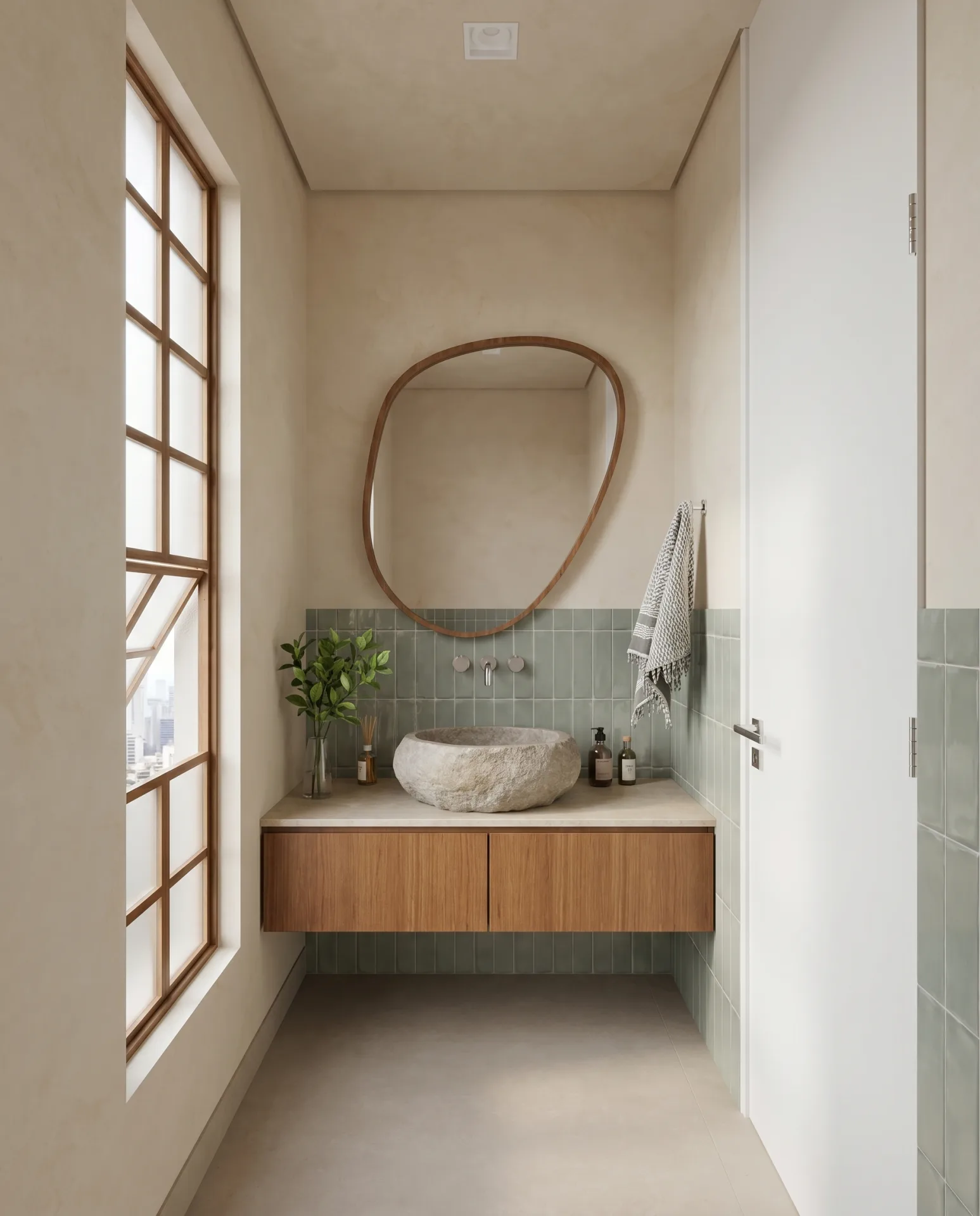
Use the pair to judge composition and visible design continuity. It does not prove physical light accuracy or dimensional accuracy; drawings and the model remain authoritative.
Primary technical sources
The practical differences
- Speed — Cloud AI can shorten the path from viewport to first presentation image. A prepared real-time or ray-traced scene may also render quickly, so compare total setup and revision time rather than one render timer.
- Hardware — Cloud AI moves computation to the provider and needs an internet connection. Traditional tools run locally or through render farms and may require a compatible GPU, CPU and operating system.
- Predictability — Traditional rendering evaluates explicit scene data and is generally more repeatable. Generative AI is probabilistic and can vary between attempts or model versions.
- Asset libraries — Traditional workflows place explicit 3D assets. AI can synthesise contextual content, which reduces setup but can also add or alter elements that require review.
- Scene setup — Traditional workflows expose more scene controls. AI workflows can start from a viewport and a smaller briefing, but material and design assumptions still need checking.
- Geometry fidelity — A traditional renderer follows the supplied scene. AI fidelity varies by input and tool; compare openings, camera, fixed furniture and proportions before approval.
Frequently asked questions
What is the difference between AI rendering and traditional rendering?+
Traditional rendering calculates an image from an explicit 3D scene using rasterisation, ray tracing or both. Generative AI synthesises an image from learned patterns, guided by inputs such as a model viewport, text or references. AI is usually less repeatable and is not a physical-light simulation.
Is AI rendering as good as V-Ray?+
They solve different problems. AI can produce a persuasive presentation image quickly, while V-Ray offers explicit scene control and physically based rendering. Compare the result for your own project and review geometry, materials and lighting rather than assuming visual equivalence.
How long does traditional rendering take compared to AI?+
There is no universal timing comparison: traditional render time depends on the prepared scene, hardware and output settings, while AI time depends on the provider and service load. Maquete’s typical 4K still completes in about 30 seconds; include scene setup and revisions when comparing workflows.
Do I need a GPU for AI rendering?+
You do not need a local rendering GPU for a cloud service such as Maquete; processing happens on the provider’s infrastructure. Traditional renderers may use a local CPU or compatible GPU, or a remote render farm, depending on the application.
When to use AI rendering
Fast iteration cycles: design development feedback rounds where the client needs to see the space developing, and you need to render after every significant decision rather than at scheduled intervals. The 30-second turnaround makes continuous visual communication practical.
Client feedback stills: AI can be useful when speed and access matter more than physically simulated lighting or total scene control. Browser-based tools also let Mac and lower-spec laptop users render without buying a local workstation, provided the cloud service and internet connection are available.
When to use traditional rendering
Physically complex scenarios: caustics (light through glass or water), multi-bounce reflections in complex geometries, very large exterior environments where correct atmospheric scale matters. These require physics simulation that AI rendering approximates rather than computes.
Repeatability: archiving the scene, assets, renderer version and settings gives a traditional workflow a clearer route to reproducing an image. Changes in software, assets, drivers or hardware can still affect the result. AI output also depends on provider model versions.
Studios with established V-Ray or Lumion workflows and dedicated render hardware may find the marginal benefit of AI rendering for their specific output quality insufficient to justify a workflow change. The tooling serves different practice types.
Can you use both?
Yes. A studio can use AI for rapid design-development images and a traditional renderer when a final image needs explicit scene control, reproducibility or physically simulated effects. The useful boundary depends on the project, not on a blanket claim that one method always wins.
Related guides
- What is AI architectural rendering?
Diffusion models, ControlNet, and how AI rendering differs from general image generation.
- Geometry preservation in AI rendering
How architecture-specific tools prevent hallucinated furniture, drifting walls, and shifted proportions.
- Lighting presets for architectural rendering
Named lighting conditions — golden hour, overcast, blue hour — and why presets beat free-text prompts.
Maquete is cloud AI rendering built around architectural fidelity — native SketchUp plugin and typical 4K stills in about 30 seconds. Review every result against your model before approval. Start free trial.