Learn
How to Stop AI Renders Changing Your Architecture
Use a clear source view, stronger structural guidance and a fixed review checklist. No generative setting guarantees exact geometry, so compare the camera, openings, fixed objects and proportions every time.
By Joshua Kenyon · Updated 13 September 2026A generative rendering system does not simply apply materials to a fixed 3D scene. It reconstructs an image from the source view and its instructions, which means it can reinterpret ambiguous edges, openings, furniture or proportions while making the result photorealistic. The practical question is not whether a tool claims fidelity, but which visible parts of the design remain stable in the output.
For architecture firms, this is a fundamental problem. The render is not a mood board — it is a representation of a specific design that has been presented to a client, submitted to a planning authority, or included in a competition entry. A render that differs from the design is not just aesthetically wrong; it can create contractual and regulatory complications.
When a detail changes
| Symptom | Check | Next step |
|---|---|---|
| Opening moved | Visibility and completeness of the source | Correct the model/capture or regenerate |
| Material changed | Distinct material boundaries and reference | Request one specific material correction |
| Several proportions shifted | Camera view and source geometry | Return to the source before stacking edits |
What is geometry preservation?
Geometry preservation is the goal of keeping the source view's spatial relationships intact: camera position, room envelope, openings, structural elements and fixed objects. A visual match can provide useful evidence, but it does not prove millimetre-level dimensional accuracy. Technical drawings and the model remain authoritative.
A real model-to-render comparison
Use the source viewport and output side by side. Start with the camera and architectural envelope before judging texture or mood.
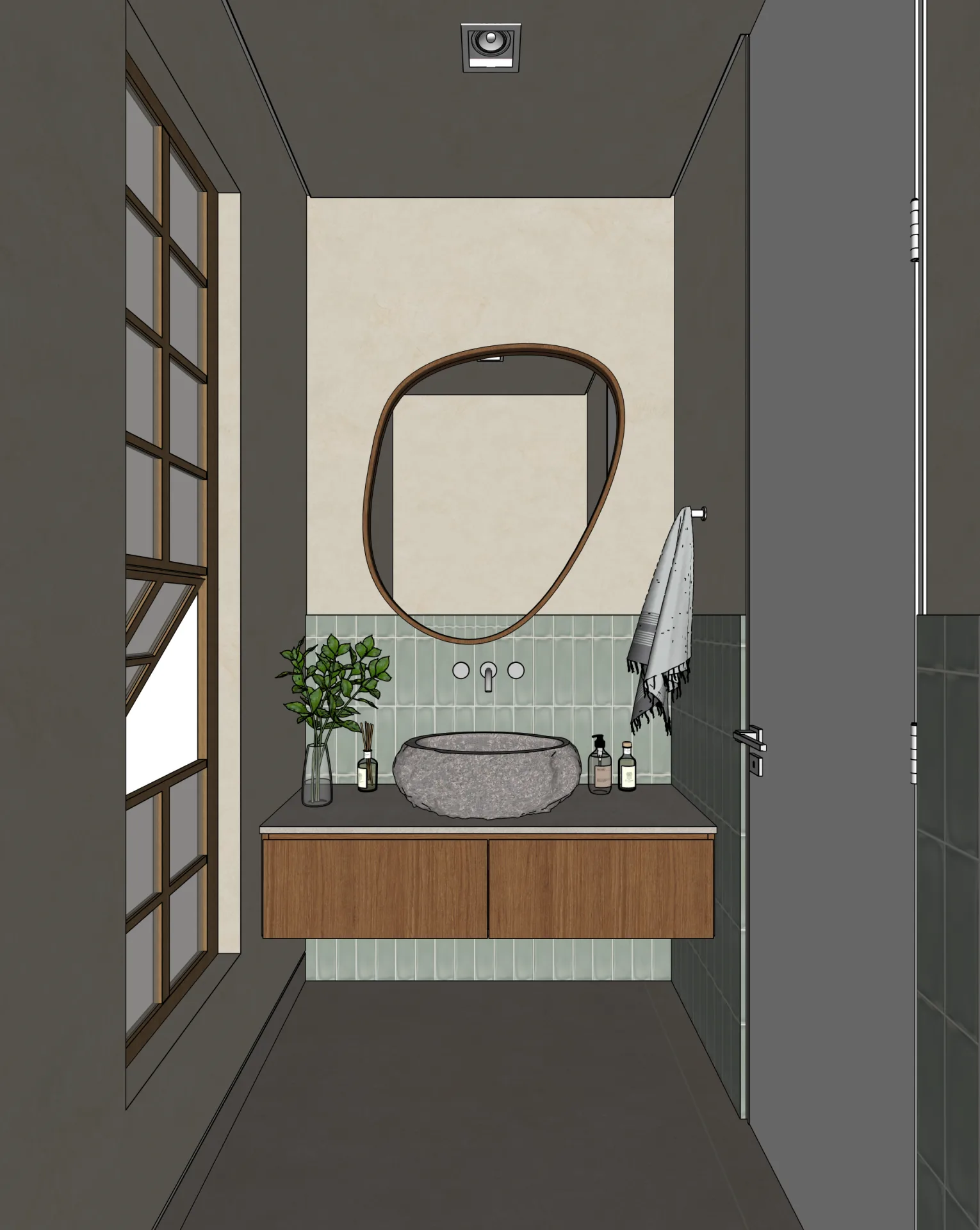
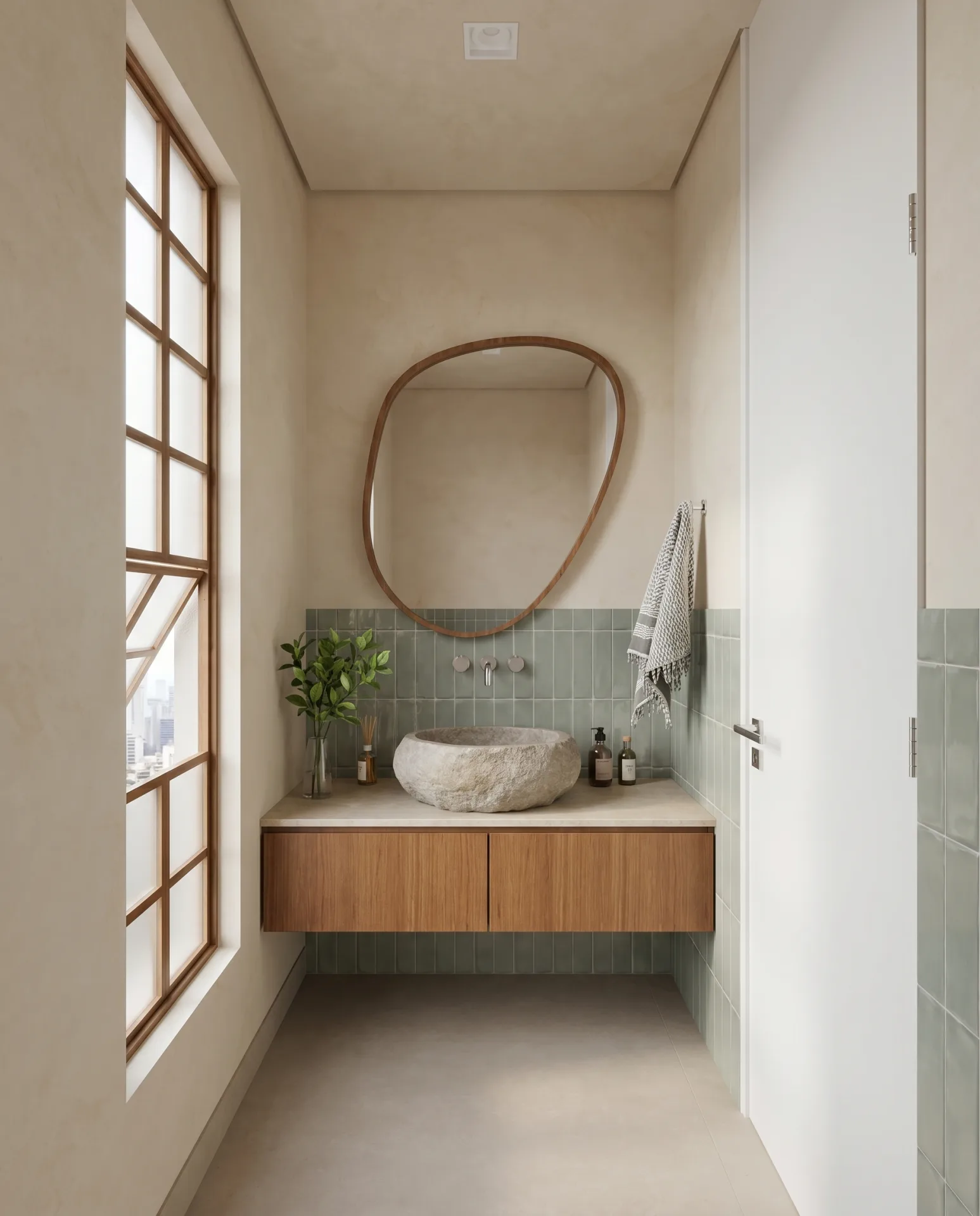
What to inspect
- Camera and envelope
- Compare the crop, ceiling and floor lines, left window bay, right-hand wall and door opening.
- Fixed elements
- Check the vanity width, basin position, mirror outline, tap set and tiled-wall boundaries.
- Interpretation
- Expect texture and lighting to become realistic. Do not mistake that surface interpretation for proof of dimensional accuracy.
This is one public example, not a benchmark or a measured pass-rate claim. Always verify an AI render against the model and technical drawings before using it for approval, planning or construction.
Technical source on spatial conditioning: ControlNet, ICCV 2023Why geometry preservation matters for architects
Three practical reasons geometry matters beyond aesthetics:
Client presentations
Clients approve designs based on renders. If the render shows a different room than the design, the client is approving something that doesn't exist. Discovering this discrepancy during construction is expensive and trust-damaging.
Planning submissions
If an AI render is used as supporting material, it must not misrepresent the proposal. Check the requirements of the relevant authority and verify the image against the submitted drawings rather than treating the render as a technical document.
Construction documentation
When a render is included in a project record, it serves as a visual reference for what was designed. Geometry drift, even minor, creates ambiguity between the render record and the technical drawings.
How AI tools handle geometry
One family of techniques uses structural conditioning derived from an input image, such as edges, depth or segmentation. ControlNet is a published example of this approach for diffusion models. Products can use different models and guidance methods, so the presence of image conditioning alone does not prove architectural fidelity.
Stronger structural guidance can reduce drift, but it also competes with realism, material changes and the ambiguity of the source image. The useful test is repeatable output: compare the same camera, openings, fixed elements and material boundaries across results, and record where manual review or regeneration is needed.
Signs your AI tool is not preserving geometry
Check your renders against the model for these patterns:
- Furniture appeared that you didn't model
- Wall positions shifted from the original layout
- Windows or doors changed proportion or position
- Materials changed colour entirely (specified white tile became grey stone)
- Room layout is recognisable but subtly different — the space feels wider or taller
Any of these signs should trigger review. The cause may be ambiguous source geometry, a conflicting instruction or insufficient structural guidance; changing the wording alone does not guarantee a correction.
How Maquete handles geometry preservation
Maquete is designed to prioritise the source camera, composition and architectural structure while improving materials, lighting and context. Its workflows combine source-aware image guidance, architecture-specific instructions and automated checks intended to catch substantial drift before delivery.
Because the output is generative, it still needs professional review. Compare every important opening, wall edge, fixed object and material boundary with the model. Use the render for visual communication; use the model and drawings for dimensions, approvals and construction information.
Frequently asked questions
What is geometry preservation in AI rendering?
Geometry preservation is the goal of keeping the source view's camera, walls, openings, proportions and fixed elements visually stable in an AI render. Because the input is a flattened view and the output is generative, a visual match does not prove dimensional accuracy; compare the result with the model and drawings.
Which AI rendering tools preserve geometry?
No product label guarantees geometry preservation. Compare tools with the same source view and check camera, openings, walls, fixed objects and material boundaries across repeated results. Architecture-specific tools such as Maquete are designed around this workflow, but every generative output still requires review.
How can I tell if an AI render has geometry drift?
Signs of geometry drift include: furniture appearing that you didn't model, wall positions shifted from the original, windows or doors changed in proportion, materials changed colour entirely, or a room layout that is recognisable but subtly different from what you designed.
Related guides
- What is AI architectural rendering?
Diffusion models, ControlNet, and how AI rendering differs from general image generation.
- AI rendering vs traditional rendering
How AI rendering compares to V-Ray, Lumion, D5 Render, and when each makes sense.
- Lighting presets for architectural rendering
Named lighting conditions — golden hour, overcast, blue hour — and why presets beat free-text prompts.
Maquete is an AI rendering platform built around source-aware fidelity, with a native SketchUp plugin and 4K still renders in about 30 seconds. Start free trial and compare a Maquete render against your model.