Learn
Lighting Presets for Architectural Rendering
Named lighting conditions that replace manual HDRI setup and sun positioning. What each preset does, when to reach for it, and how they work in AI rendering.
By Joshua Kenyon · Updated July 2026Lighting is the single biggest variable in how a render feels. The same space photographed at midday, golden hour, and blue hour produces three completely different impressions — and most of that difference has nothing to do with the architecture.
AI rendering tools with named lighting presets let you request these visual conditions in one selection, without manually configuring a sun, HDRI environment or exposure. The exact implementation varies by product: a generative preset describes the intended appearance, but it is not a physical daylight simulation.
What is a lighting preset?
A named visual condition that packages a target direction, warmth, sky state and shadow character into one choice. Instead of writing a long description of low warm sunlight and extended shadows, you select "golden hour".
In a traditional rendering engine, you would configure an environment, position light sources, set exposure and run test renders. A generative preset shortens the visual workflow, but it does not replace measured sun studies, lux calculations or physically based lighting design.
Same design, two lighting choices
These two public outputs use the same powder-room design. The comparison isolates the practical decision a preset helps you make: neutral readability or warm presentation mood.
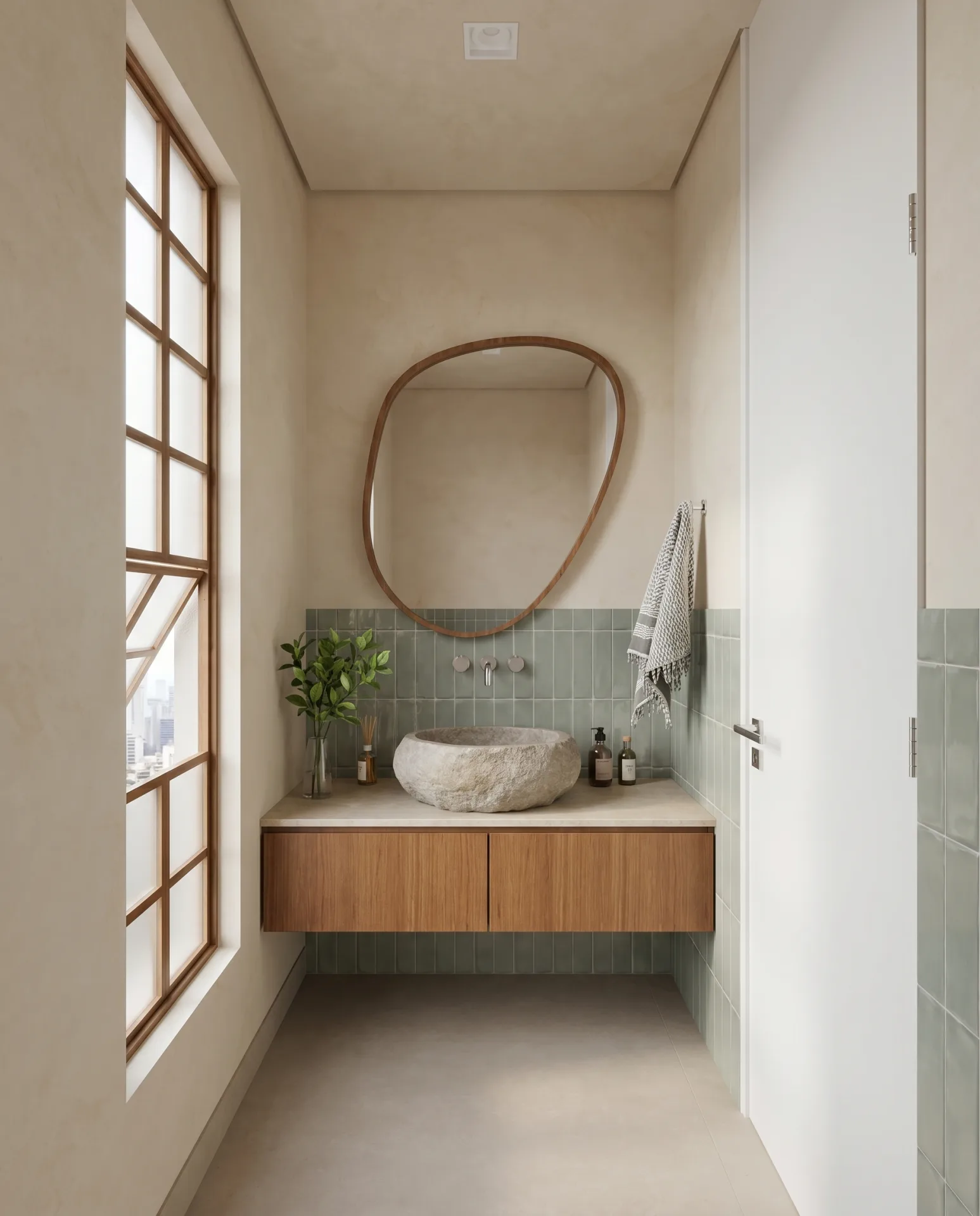
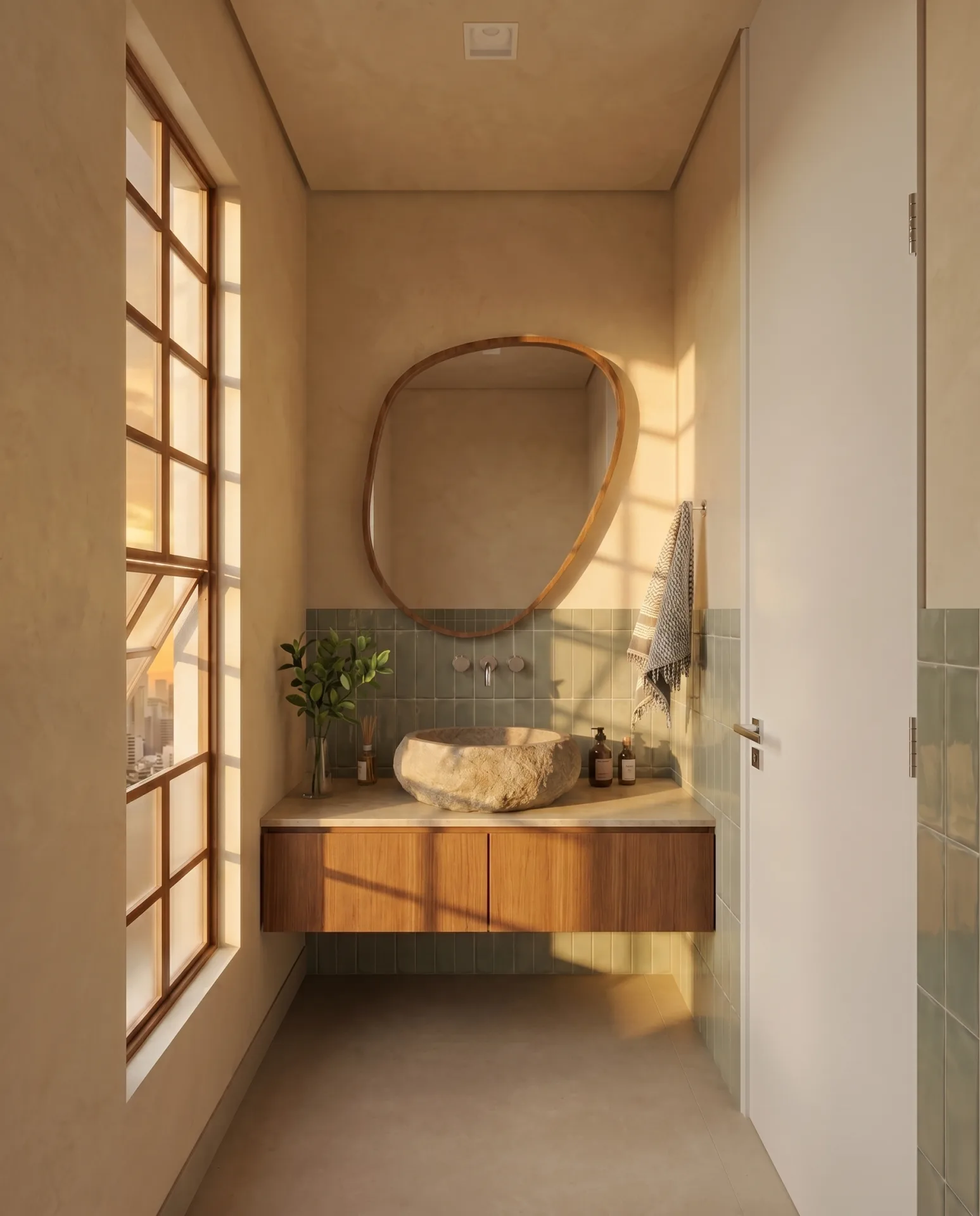
What changes
- Colour
- Daylight makes the green tile and pale walls easier to evaluate. Golden hour warms every finish.
- Shadow
- Golden hour introduces long window shadows and stronger contrast; daylight is more even.
- Use
- Use the neutral version for material review and the warm version for atmosphere-led client presentation.
This is an illustrative pair, not a colour-calibrated or blind test. Presets affect mood and apparent material colour, so confirm finishes under a neutral condition before approval.
The key lighting conditions
Golden hour
What it looks like: Low sun angle, warm amber/orange light, long soft shadows. Colour temperature ~2500–3000K.
Mood: Warmth, invitation, the feeling of a lived-in home. The most universally flattering condition for residential architecture.
Best for: Residential interiors, warmth-forward client presentations, exterior shots.
Avoid for: Material accuracy — the amber cast shifts every colour. If a client needs to evaluate actual finish colours, golden hour misleads them.
Overcast
What it looks like: Flat, even, shadowless light from all directions. Colour temperature ~6000–7000K — slightly cool and neutral.
Mood: Technically neutral. The space speaks for itself without light creating emotional context around it.
Best for: Showing materials and finishes accurately. Retail and commercial spaces. Any render where the client is evaluating surfaces rather than feeling the space.
Avoid for: Residential presentations to clients who need to respond emotionally. Overcast can make warm spaces feel clinical.
Blue hour
What it looks like: Deep blue exterior sky, warm artificial interior glow. The contrast between cool exterior and warm interior is the defining characteristic.
Mood: Luxury, inhabited warmth, the sense that this is a space people want to be in after dark.
Best for: High-end residential, hospitality, restaurants, boutique retail. Any project where atmosphere is the primary selling point.
Avoid for: Spaces where natural light quality is a selling point, or daytime spaces where the premise of the render is solar access.
Midday
What it looks like: High sun, neutral white light, sharp hard shadows, high contrast. Colour temperature ~5500K.
Mood: Clarity, activity, daytime function. Honest and commercial.
Best for: Commercial interiors, office environments, retail spaces, exterior massing shots.
Avoid for: Residential presentations where warmth matters. Hard midday shadows also reveal modelling imprecisions more clearly.
Interior artificial
What it looks like: No natural light. The scene is lit entirely by artificial sources — pendants, spotlights, wall sconces, ambient fill.
Mood: Intimacy, intentionality. Says 'this space was designed to be lit this way.'
Best for: Lighting design presentations, restaurant and hospitality interiors, bedroom and living room evening use cases.
Avoid for: Spaces where you're relying on natural light as a selling point. Artificial-only renders require that light sources are actually specified in the design.
Dusk / twilight
What it looks like: Residual orange on the horizon, deep purple-blue sky above. More dramatic than blue hour — the sky is an active compositional element.
Mood: Drama, scale, anticipation. The most theatrical of the conditions.
Best for: Exterior shots where the sky contributes to the image. Tall commercial buildings where verticality needs emphasis. Roof terraces and balconies.
Avoid for: Interior shots where the exterior isn't visible. Dusk is wasted without a view out.
Quick reference: matching lighting to project type
- Residential warmth→ Golden hour
- Material & finish accuracy→ Overcast
- Luxury / hospitality atmosphere→ Blue hour
- Commercial / office / retail→ Midday
- Lighting design presentation→ Interior artificial
- Exterior massing or tall buildings→ Dusk or midday
Prompt-controlled vs preset lighting
Free-text workflows ask you to describe the desired light in words, such as "warm evening light from the west with long shadows." That gives flexibility, but wording can introduce another variable when you compare scenes or camera angles.
Named presets give the instruction a stable label and make the choice easier to repeat. Results remain generative, so consistency should be checked visually—especially when matching multiple views or approving finish colours.
Frequently asked questions
What is a lighting preset in architectural rendering?
A named lighting condition (golden hour, overcast, blue hour) that sets the sun angle, colour temperature, sky condition, and shadow quality for a render. Rather than manually configuring these values, you select a preset and the rendering tool applies the full lighting setup.
What is the best lighting for an interior render?
Golden hour produces the warmest, most flattering light for most residential interiors. Overcast is best when you want to showcase materials and finishes without dramatic shadows. Blue hour works well for luxury and hospitality spaces where mood matters more than clarity.
How does golden hour lighting work in AI rendering?
A golden-hour preset requests the visual characteristics associated with low warm sunlight, including longer directional shadows and an amber colour cast. It is a generative appearance control rather than a measured sun-position or daylight simulation, so results should be reviewed visually.
Related guides
- What is AI architectural rendering?
Diffusion models, ControlNet, and how AI rendering differs from general image generation.
- AI rendering vs traditional rendering
How AI rendering compares to V-Ray, Lumion, D5 Render, and when each makes sense.
- Geometry preservation in AI rendering
How architecture-specific tools prevent hallucinated furniture, drifting walls, and shifted proportions.
Maquete includes 15+ named lighting presets alongside its native SketchUp plugin — golden hour, blue hour, overcast, midday, and more. Start free trial.