AI renderers can turn a SketchUp view into a convincing image in about a minute, but architects keep asking the same question: does the render keep my design, or does it quietly redraw it? We tested that on 30 real SketchUp views. Walls, doors, built-in joinery and furniture outlines stayed where the model put them. The changes we found were in curtains, fine decorative details, some window-frame edges and street context.
This is a measurement of Maquete's own output, made from views modelled by our co-founder Laura Consoni, a licensed architect. It is not a comparison with other tools, and an experienced user is close to a best case. The method is simple enough to repeat on your own renders, and we explain it below.
What we measured
We took the 30 most recent distinct SketchUp exports Laura rendered with Maquete's Guided interior and exterior tools between 20 September and 20 October 2026: 25 interiors and 5 exteriors. Several are camera or design variations of the same room, so together they cover 10 spaces, including a home office, a hallway, a living room, a kitchen, a house and a waterfront building. We kept every view, including the weaker ones, and used the render she kept for each.
For each pair we ran two checks:
- Line overlay. We traced the edges of the SketchUp view and of the render at the same size, then counted how many of the model's lines had a render line within 1% of the image width (about 10 pixels at 1,024 pixels wide). In the images below, orange marks a model line found in the render and pink marks one that was not.
- Edge correlation. This is the check Maquete already runs on Guided renders: it compares where edges sit in the two images. A render that scores below 0.2 is treated as a recomposition rather than a render of your view. None of the 30 came close to that threshold.
The results
| Measure | Lowest | Median | Highest |
|---|---|---|---|
| Model lines found within 1% of image width | 54% | 77% | 99.5% |
| Edge correlation (below 0.2 means recomposed) | 0.53 | 0.72 | 0.87 |
13 of the 30 views kept at least 90% of their model lines, and 18 kept at least 70%. Exteriors scored higher on the line overlay (median 96%) than interiors (median 73%), mostly because interiors contain more soft furnishings and decoration.
A missing line is not always an error, and a found line is not proof. Edge tracing also picks up texture lines, shadows and reflections. That is why we looked at every overlay rather than trusting the numbers alone.
What held: the architecture
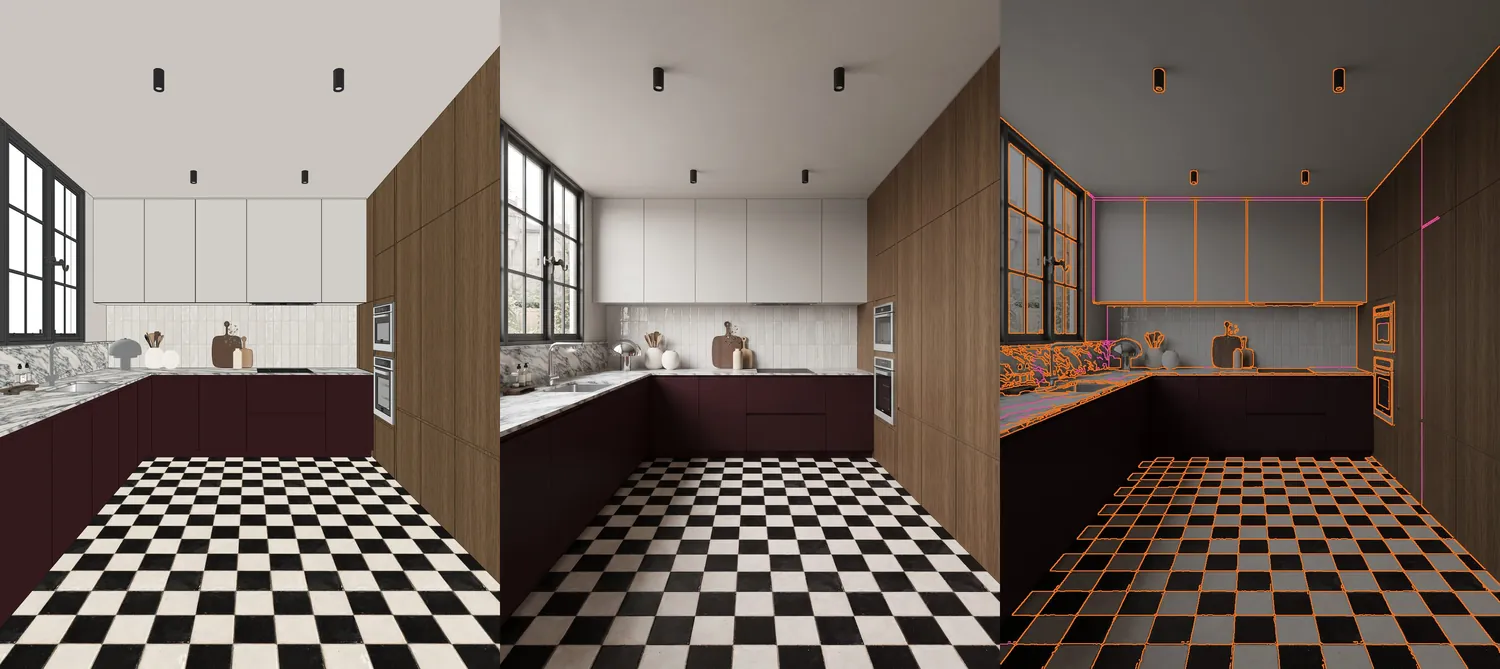
Kitchen: SketchUp view, render, and overlay. 92% of model lines found. The window, cabinet fronts, ovens, wall panels and the full floor grid line up; the misses are the top edge of the wall cabinets and one panel joint.
In every one of the 10 spaces, the hard elements of the design landed on the model's lines: wall and ceiling junctions, door openings, built-in joinery, shelving, cabinet fronts, desks, chairs, sofas and patterned floors. For a client presentation, these are the elements that have to match the drawings.
Window openings stayed in place too, but their frames were not always traced within the 1% tolerance: in the living-room views the render drew slightly different frame profiles, and some shallow wall-panel grooves were softened. Neither moved the opening or the wall; both are worth a glance when the detail matters.
What moved
Soft furnishings
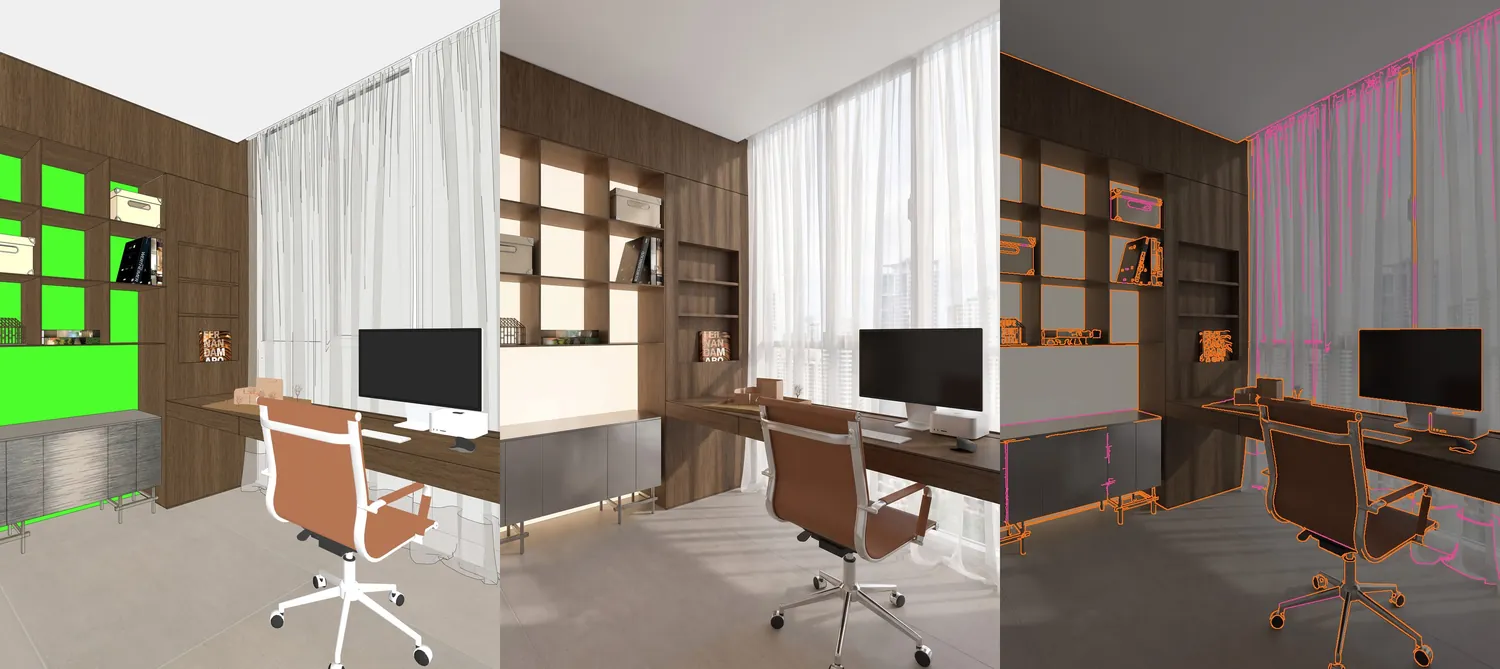
Home office: 54% of model lines found, the lowest score in the set. The shelving, desk, monitor and chair outlines line up; almost all of the pink is curtain folds, which the render redraws as real fabric.
Curtains were the biggest source of missed lines. A SketchUp curtain is a set of drawn folds; a photograph of a sheer curtain has soft, light-dependent folds that do not follow the model's lines. The curtain is still there, at the same height and position, but its folds are new.
This view also shows something the overlay cannot measure: the chair base changed from white to chrome while its outline stayed in place. Lines can match while a material changes, so check finishes separately.
Fine decorative details
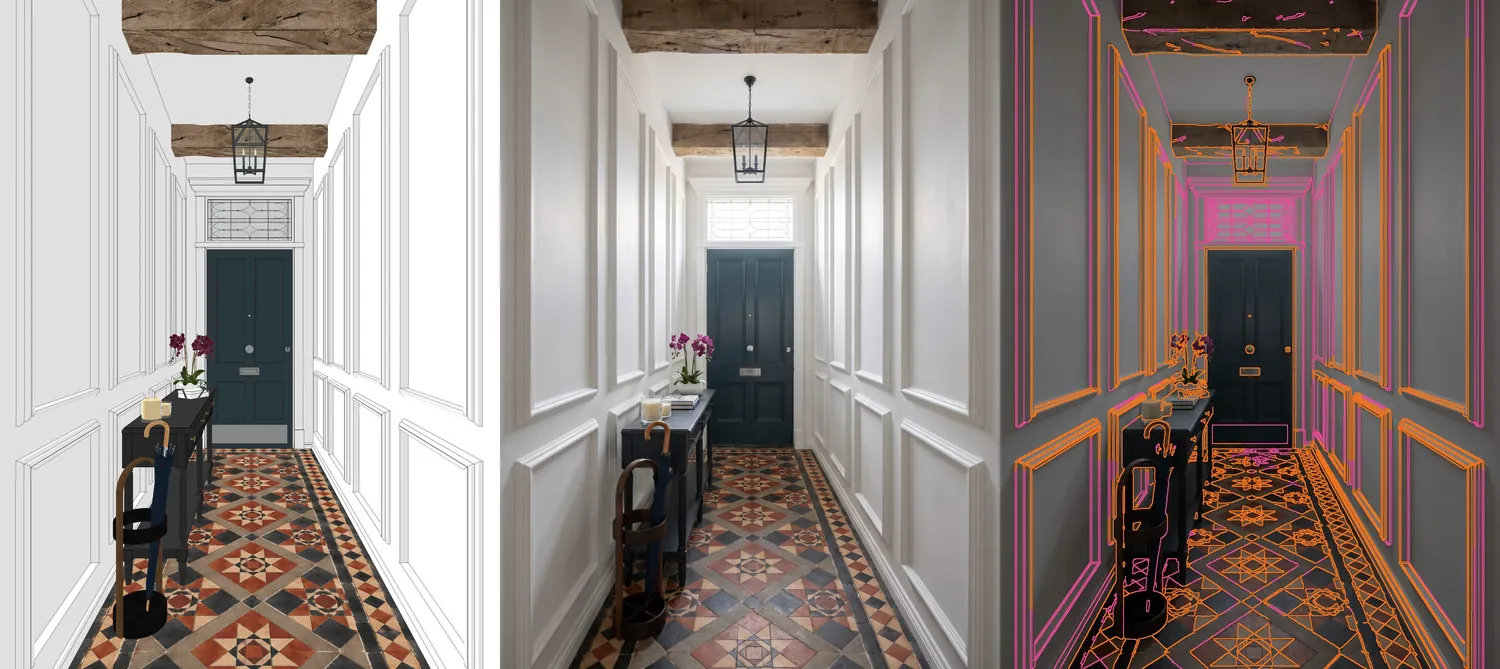
Hallway: 63% of model lines found. The walls, panel mouldings, ceiling beam, door and floor pattern hold. The leaded fanlight above the door was redrawn with a different glazing pattern.
Small decorative patterns are where a render is most likely to substitute its own version. If a detail like a fanlight, a balustrade pattern or a tile motif matters to the design, zoom in on it before you share the image.
Context outside the building
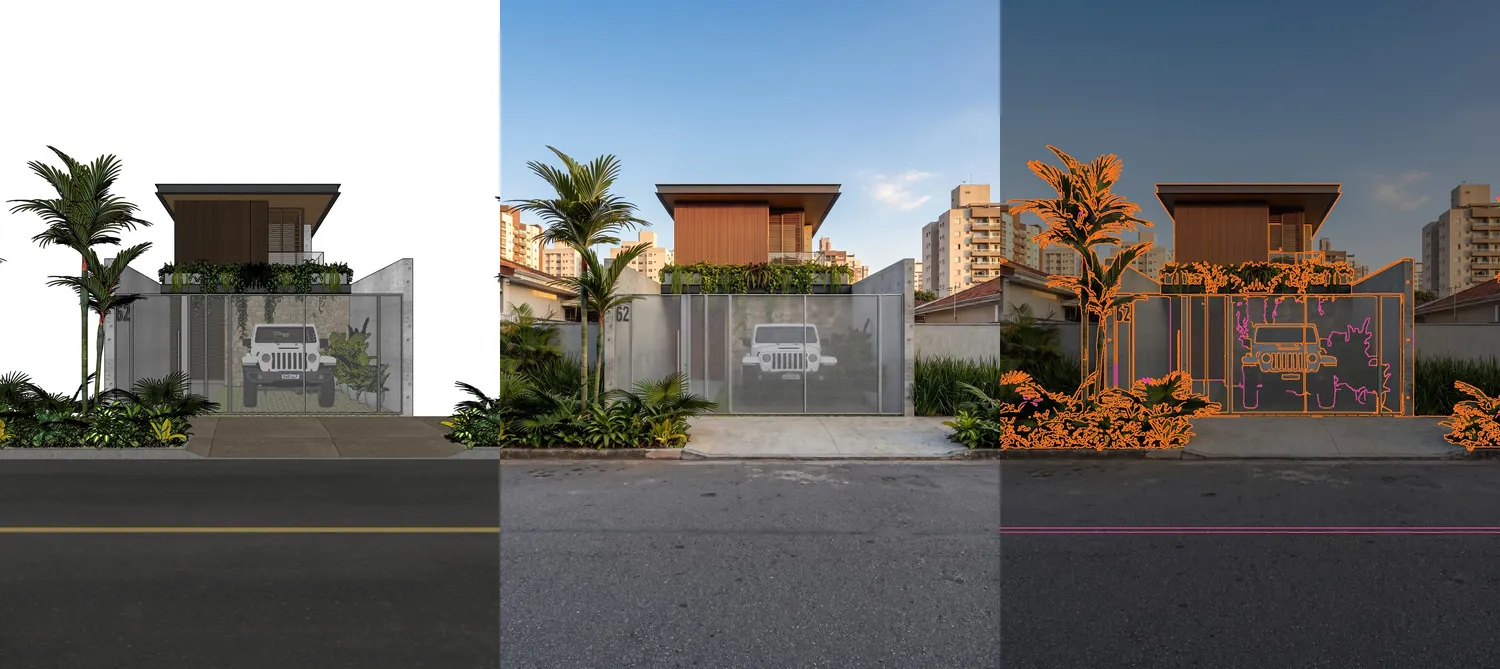
Exterior: 90% of model lines found, but the lowest edge correlation in the set (0.53). The house, gate, wall and planting line up. The render added sky and neighbouring buildings that the model did not have, and dropped the yellow centre line from the road.
Exterior renders add context: sky, background buildings and street detail. That lowers the edge correlation even when the building itself matches. It also means context the model did contain can be simplified, as the road marking was here.
How to check your own renders
You do not need code to do a quick version of this test:
- Export the SketchUp view and the render at the same pixel size.
- In any image editor, place the render over the view at about 50% opacity.
- Check walls, openings and built-in joinery first; these should sit on the model's lines.
- Then check decorative details, soft furnishings and context, where changes are most likely.
- Check materials separately, because an outline can match while a finish changes.
Our guide to geometry preservation in AI rendering explains why these changes happen, and why AI renders hallucinate furniture covers the most common failure.
What this test does not show
- It is one experienced user and 10 spaces. Laura models carefully and knows the tool well, and several of the 30 views are variations of the same room. Rough models, line drawings or unusual camera angles may score lower.
- It covers Maquete only. We did not run the same views through other tools.
- It measures lines, not meaning. A door can keep its outline and change its style, and a material can change without moving a line.
If you want to try the same check on your own model, start with one representative view.
Frequently asked questions
Does AI rendering change my SketchUp geometry?
It can. In our overlay test of 30 SketchUp views of 10 spaces rendered with Maquete, walls, doors, built-in joinery and furniture outlines stayed in place, while curtains, fine decorative details, some window-frame edges and street context were where changes appeared. Always compare the render with your model before sending it to a client.
How did you measure geometry preservation?
We traced the edges of each SketchUp view and of its render, then counted how many of the model's lines had a matching line in the render within 1% of the image width. We also report the edge-correlation score Maquete already uses to catch renders that recompose the scene.
What score counts as good?
There is no single pass mark. Across these 30 views the median was 77% of model lines found, ranging from 54% to 99.5%. A low score often comes from soft or decorative elements, such as curtain folds, so look at where the missing lines are rather than at the number alone.
Does the overlay catch material changes?
No. An overlay compares lines, not colours or finishes. In one render the chair base changed from white to chrome while its outline stayed in place, so check materials separately.
Can I run this check on my own renders?
Yes. Export your SketchUp view and the render at the same size, set the render to about 50% opacity over the model in any image editor and look at the walls, openings and built-in joinery first.