Lumion alternative
Lumion AI render alternative for architects: no GPU, no Windows, no scene setup
If you need a Lumion alternative for Mac, browser-based work, or a Lumion AI render workflow for faster client stills, Maquete produces photorealistic 4K architectural renders in ~30 seconds from SketchUp. Runs in any browser, costs a fraction of Lumion, and starts with a 7-day Pro trial.
Why architects switch from Lumion to Maquete
Frontier AI, no scene setup
Lumion is a real-time renderer: it renders the materials, assets, lighting and atmosphere you set up. Maquete uses an architectural AI rendering and validation pipeline to create those qualities from a model view plus a brief. The tradeoff is explicit: Lumion gives deterministic scene control; Maquete removes most scene setup.
A Lumion alternative for Mac and browser-based studios
The full Lumion Pro application requires Windows, a compatible dedicated GPU and sufficient system memory. Lumion View for SketchUp now has a separate Mac edition with a narrower feature set. Maquete renders in the cloud and runs in a browser on Mac, Windows, iPad and ordinary laptops, with no local renderer or driver maintenance.
AI rendering instead of Lumion scene setup
A Lumion project requires importing your model, placing assets from the library, assigning materials, setting lighting, and configuring atmosphere before you can render. Maquete skips that Lumion setup loop — upload your SketchUp viewport or use the plugin, choose a style, and get a 4K render back in ~30 seconds.
Lower entry and hardware cost
Maquete plans start at $9/month and Studio is $59/month. Lumion now sells Lumion Pro as its standalone subscription, with regional pricing on its official store. Compare the live licence price plus workstation cost rather than relying on an old Lumion Standard figure.
Client sharing built in
Lumion outputs are rendered files you export and send. Maquete projects get a public share URL — clients view renders in a clean gallery, leave comments inline, and approve without email chains. For async client review workflows, this replaces a separate tool entirely.
What to look for in a Lumion alternative
Most architects searching for a Lumion alternative or a faster AI workflow are not just comparing image quality. They are usually trying to reduce local hardware requirements, scene setup, or annual licence cost. Lumion Pro and the newer, narrower Lumion View for SketchUp on Mac should be evaluated as different products.
If you need a Lumion alternative for Mac
Prioritise browser-based or cloud rendering. Maquete runs on Mac because the render happens in the cloud, not on a local GPU. That makes it a practical Lumion alternative for MacBook-based studios, site laptops, and mixed-device teams.
If setup time is the problem
Choose an AI renderer that works from a SketchUp viewport instead of asking you to build a full render scene. Maquete is designed for stills and short walkthroughs where you need a client-ready image quickly, not a fully staged real-time environment.
If cost is the reason you are leaving Lumion
Compare the annual licence plus hardware cost, not just subscription price. Lumion can be the right tool for animation-heavy studios, but for architects mainly producing client stills, Maquete's cloud workflow is usually far cheaper.
A real input and output
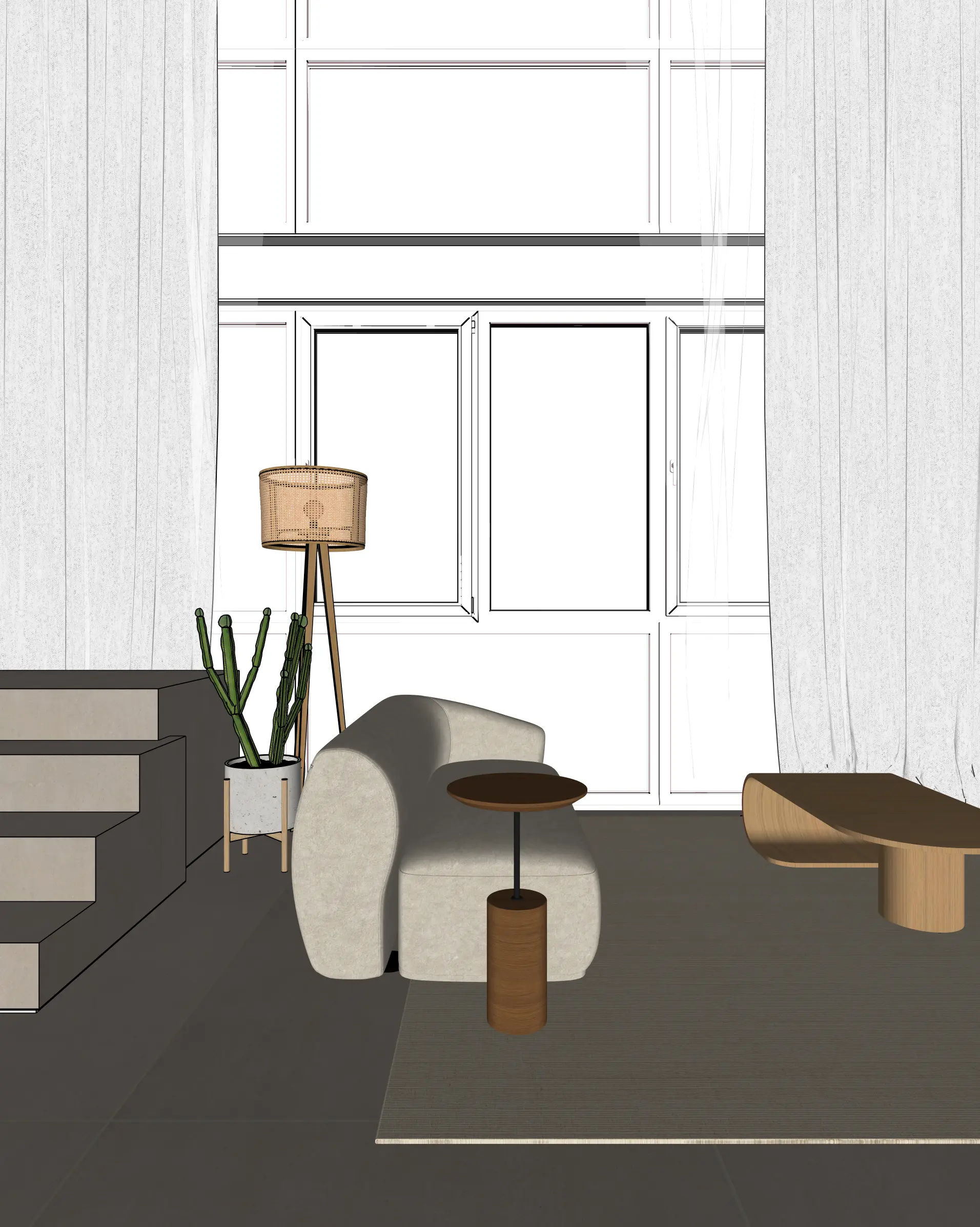
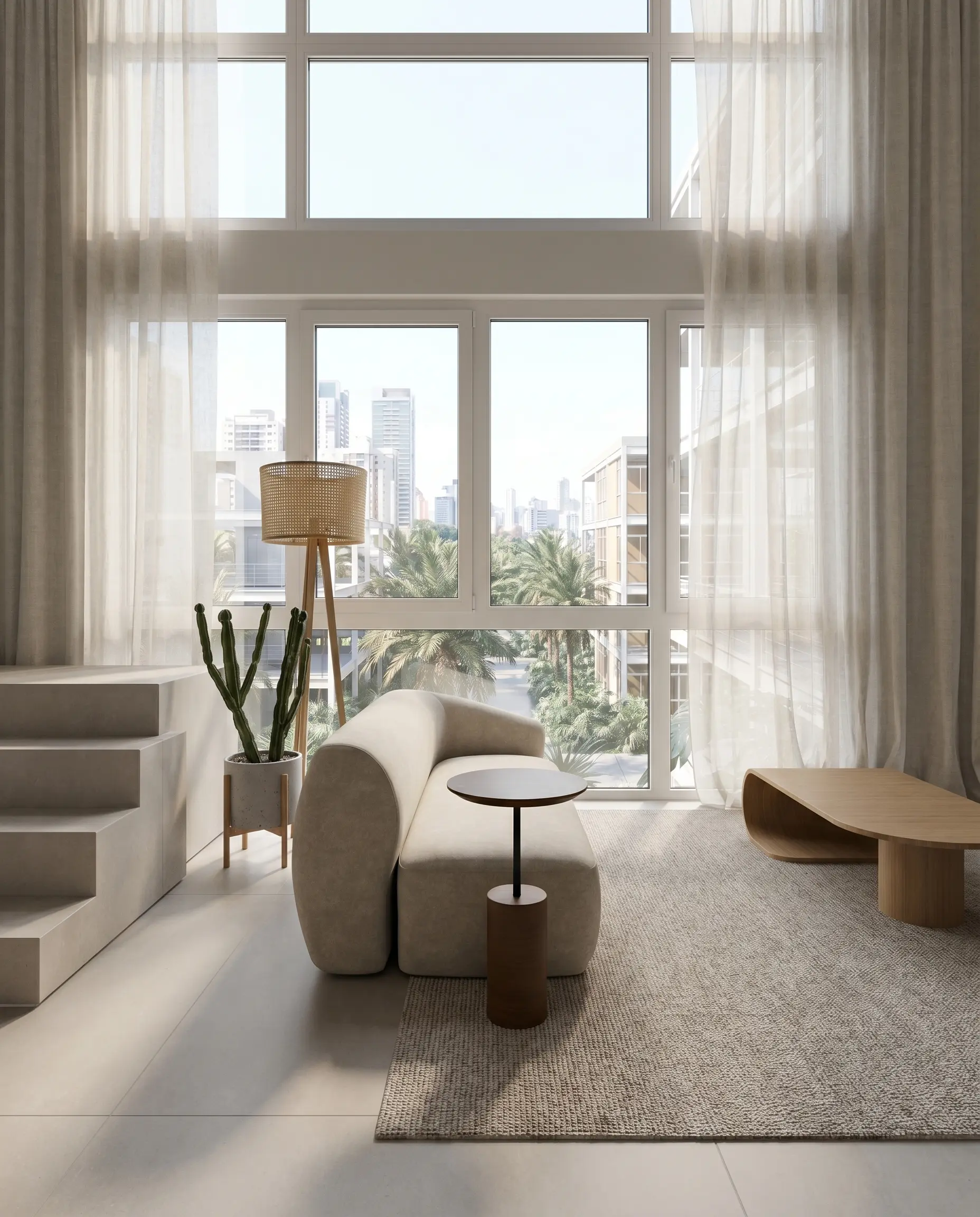
This is a disclosed Maquete example, not a Lumion render. The original SketchUp viewport and generated result use the same composition so you can inspect what stayed and what changed.
Sources checked 21 July 2026
Maquete vs Lumion at a glance
| Maquete | Lumion | |
|---|---|---|
| Hardware required | None — cloud rendered | Compatible dedicated GPU + Windows |
| Pricing model | $9–99/mo; annual options | Annual Pro subscription; regional price |
| Operating system | Any (browser-based) | Pro: Windows; View for SketchUp: Windows + Mac edition |
| Render time | ~30 seconds per 4K | Seconds to minutes + scene setup |
| Scene setup | None — upload and render | Asset placement + materials required |
| Asset library | AI-generated context | Large placeable 3D/people/material library |
| Animation / video | AI video walkthroughs | Full animation + movie mode |
| SketchUp integration | Native plugin | LiveSync plugin |
| Client sharing | Share links + inline feedback | Export files |
When Lumion is still the right choice
Lumion is still the better tool for large-scale landscape and masterplanning visualisations where precise asset placement — specific trees, vehicles, people — matters. Its animation engine is also more capable for complex camera path animations and live client walkthroughs. If you present to clients in a live interactive session where you fly through a model in real time, Lumion's interactivity is hard to replace.
For residential and commercial stills, Maquete can be a faster route to a persuasive client image. The workflows are not equivalent: compare both tools on your own model, and review every generative result against the source before using it in an approval or submission.
Frequently asked questions
Is Maquete a good Lumion alternative?
Yes — Maquete is a strong Lumion alternative for architects who need photorealistic renders without Lumion's hardware requirements, Windows dependency, or high annual cost. Maquete runs in any browser with no GPU, produces 4K stills in ~30 seconds, and costs a fraction of Lumion Pro. For interactive real-time walkthroughs, Lumion still has an edge.
What is the main advantage of Maquete over Lumion?
Speed, lower setup, and hardware freedom. Lumion requires Windows and a compatible dedicated GPU. Maquete runs in a browser on any device, costs $9–99/month, and needs no local rendering GPU. A 4K architectural render takes about 30 seconds with no full scene setup.
Can I run Maquete on a Mac instead of Lumion?
Yes. Maquete is browser-based and works on Mac, Windows, Linux, and iPad. The full Lumion Pro application remains Windows-based, while Lumion View for SketchUp has a separate Mac edition with a narrower workflow. Maquete removes the local OS and GPU dependency.
How does Maquete compare to Lumion on output quality?
They use different rendering approaches, so output quality is scene- and purpose-dependent. Maquete can create persuasive interior and exterior stills quickly, but the result is generative and must be reviewed. Lumion offers deterministic scene control and is stronger for large landscapes and complex animations. Test both on the same representative model.
How much cheaper is Maquete than Lumion?
Maquete paid plans are $9–99/month, with annual options from $90–$990/year. Lumion Standard is no longer sold as a separate product; Lumion Pro is the current standalone subscription and its price varies by region. Check Lumion's live store and include workstation cost for a fair comparison.