The best AI rendering tool depends on the job. Maquete and Veras suit fast generative stills; D5, Enscape and Lumion suit live or staged real-time workflows; V-Ray remains the high-control choice for physically based output. There is no credible single winner for every architect.
This comparison covers ten tools worth considering in 2026. Maquete is included because we built it, but it is not the right tool for every use case. Product details and public pricing were rechecked on 18 August 2026. Prices exclude tax, vary by region, and should be confirmed with the vendor.
How we compared them
We compared architecture-specific workflow, geometry controls, output purpose, hardware requirements, vendor documentation and public cost—not cherry-picked gallery images. We have not run the same private project through all ten paid products, so this is a researched comparison rather than a claimed laboratory benchmark. Traditional engines are deterministic; generative AI tools are probabilistic, so test shortlisted tools on your own representative model.
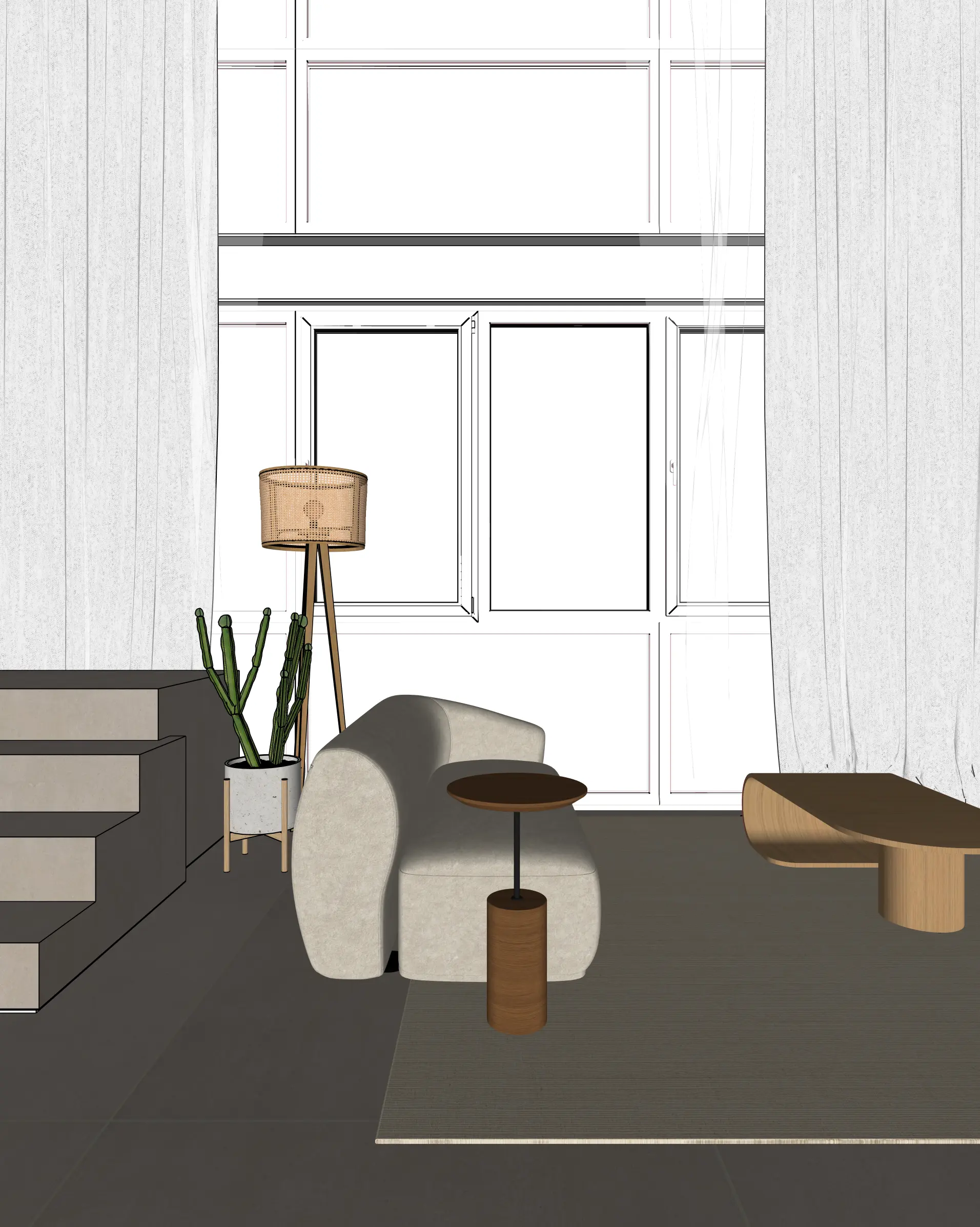
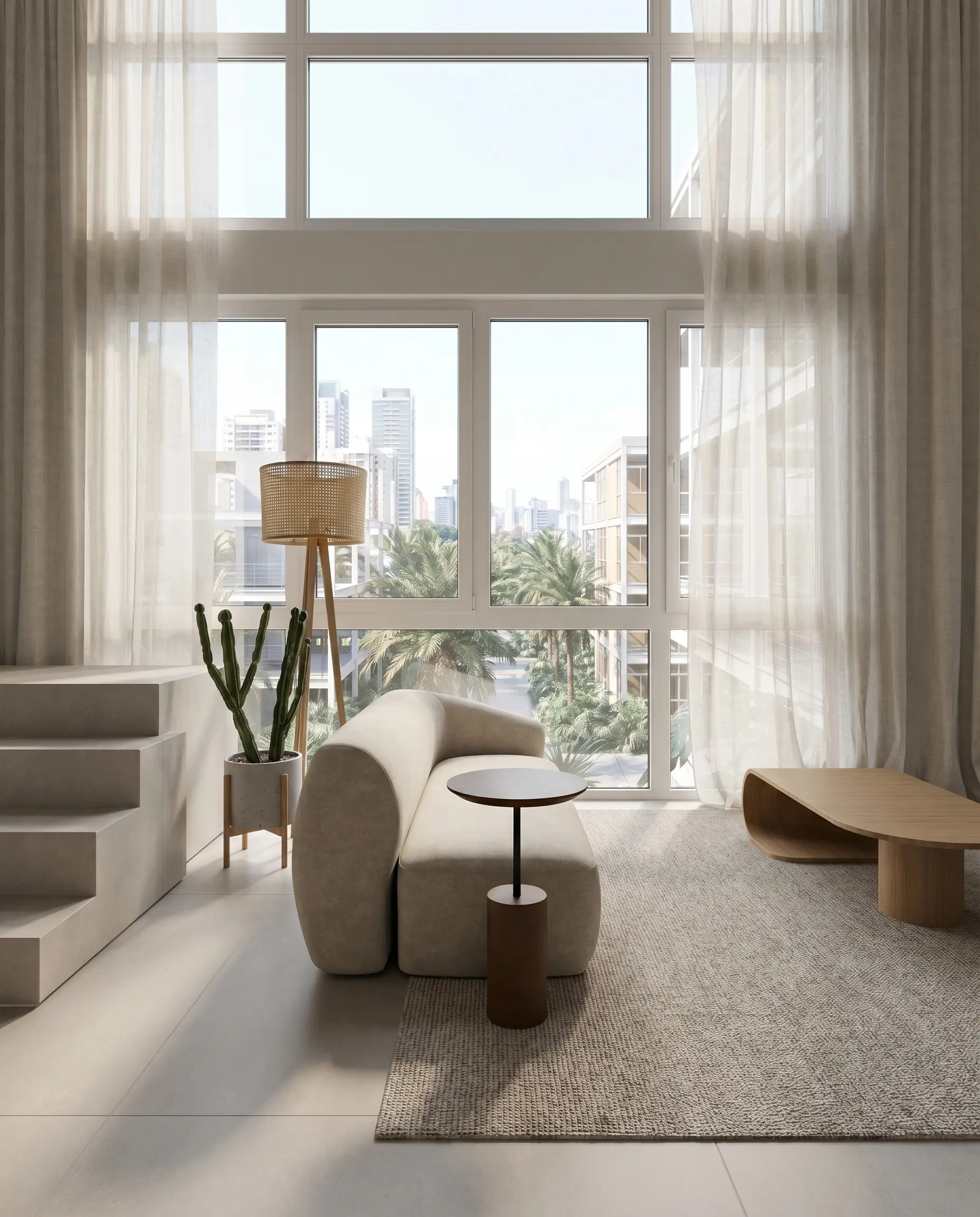
Here is one disclosed Maquete example showing the actual SketchUp input followed by its render. The same camera composition and principal objects remain visible; the output adds photorealistic materials, lighting and exterior context.
What makes a good AI rendering tool for architects?
Before the comparison, the criteria. Five things actually matter:
- Geometry preservation — does the render show what you designed, or what the AI thinks you designed?
- Workflow integration — how many steps between model and render?
- Output quality — is the result good enough for client deliverables?
- Render speed — how long are you waiting?
- Pricing — what's the real cost at your render volume?
Generic criteria like "ease of use" matter less than these. An architect who renders 30 stills a month cares about geometry fidelity and volume pricing above almost everything else.
The tools
1. Maquete — best for SketchUp users who need geometry fidelity
What it is: Cloud AI rendering with a native SketchUp plugin. You render directly from your active viewport without leaving SketchUp. Output is 4K in approximately 30 seconds.
Geometry fidelity: This is Maquete's primary engineering priority. Prompts and validators are tuned to reduce visible changes to walls, openings, proportions, and structural elements. The output remains generative, so client deliverables should be checked against the source model.
Best for: SketchUp-first practices that need faithful client renders, competition entries, and marketing materials.
Limitations: No native Revit or Rhino plugin (image upload works but it's not one-click). No real-time interactive walkthroughs — renders are stills and pre-baked video walkthroughs. If you need live in-meeting 3D fly-throughs, look at D5 Render.
Pricing: 7-day Pro trial with 30 trial renders; paid plans from $9/month.
Worth knowing: Maquete also generates AI walkthrough videos and has built-in client sharing links with inline feedback — useful for asynchronous client review workflows.
2. Veras (by EvolveLAB) — best for creative concept exploration
What it is: AI rendering plugin for SketchUp, Revit, and Rhino. Prompt-driven creative control with generative diffusion.
Geometry preservation: Veras leans into creative reinterpretation as a feature. The AI will suggest how a space could look — adding atmosphere, implied furniture, lighting — rather than faithfully rendering what's there. This is genuinely useful in early design phases. It's not what you want for a planning submission.
Best for: Early concept work, mood-finding, alternative material exploration. Studios that are still iterating on a design and want AI to suggest directions.
Limitations: Output can diverge significantly from input geometry. Prompt skill affects output quality noticeably. Not ideal for client-facing deliverables where the render must match the design exactly.
Pricing: On 18 August 2026, the official Veras page listed Starter from $16.90/month billed annually and Pro at $29/month billed annually. Monthly billing and bundles can differ, so verify the checkout before buying.
3. D5 Render — best free entry point for Windows real-time rendering
What it is: Real-time GPU renderer built on Unreal-style ray tracing. Extensive asset library. LiveSync plugins for SketchUp, Revit, Rhino, and Archicad.
Geometry preservation: D5 renders your geometry deterministically — it produces exactly what's in the scene, consistently. No creative reinterpretation.
Best for: Studios that present to clients in real-time, need to walk through the model live, and have Windows workstations with RTX-class GPUs.
Limitations: Windows-only—a hard blocker for Mac studios—and requires a compatible ray-tracing GPU. D5's published minimum includes a GTX 1060 6GB or equivalent; the right specification rises with scene complexity.
Pricing: Community is free for non-commercial work and currently includes 2,100+ assets; Pro lists 16,000+. Check D5 pricing and system requirements.
4. Lumion — best for presentation-ready walkthroughs with asset depth
What it is: GPU-based real-time renderer with one of the deepest asset libraries in architecture visualisation. Popular for full-building walkthroughs.
Geometry preservation: Deterministic — renders what you model.
Best for: Established practices with Windows workstations that need polished flythrough animations and extensive plant/furniture/people libraries.
Limitations: The full Lumion Pro application is Windows-based and depends on a dedicated GPU and sufficient memory. Lumion View for SketchUp also has a separate Mac edition, but it is a narrower product rather than the full Pro workflow. Both approaches still require more explicit scene/material preparation than an AI still generator.
Pricing: Lumion's product structure changed in 2025: Standard is no longer sold separately and Lumion Pro is the current standalone subscription. Public pricing is regional, so check Lumion directly rather than relying on an old dollar figure.
5. V-Ray (by Chaos) — best for physically accurate interiors at the top end
What it is: Industry-standard unbiased ray tracer. The reference-quality renderer for architectural visualisation.
Geometry preservation: Completely deterministic — V-Ray simulates physics, it doesn't interpret.
Best for: High-end residential, hospitality, and commercial firms where pixel-perfect lighting accuracy and material precision justify the setup time. Agencies producing competition imagery and publication renders.
Limitations: Render times are measured in minutes to hours for complex scenes. Requires scene setup, material assignment, and lighting knowledge. Steep learning curve. Windows-preferred (SketchUp plugin is Windows/Mac, but performance leans Windows).
Pricing: V-Ray Solo is $45/month billed annually ($540/year) on the official V-Ray for SketchUp page when checked.
6. Rendair — best for quick standalone stills without a CAD plugin
What it is: Browser-based AI rendering for architects. Upload an image, choose a style, receive a render. No plugin required.
Geometry preservation: Standard diffusion approach — some reinterpretation is common, particularly for complex spaces.
Best for: Architects who work across multiple 3D tools and prefer a simple browser upload workflow. Lower price point for occasional use.
Limitations: No native CAD plugin. Browser upload only. No video walkthrough generation. Less control over material specificity than Maquete.
Pricing: From ~$19/month.
7. Enscape — best for live walkthroughs inside the design workflow
What it is: A real-time renderer for SketchUp and other design tools, with live navigation, assets and presentation features.
Best for: Live client meetings and continuous design review where moving through the model matters more than generating a still quickly.
Limitations: It needs suitable local graphics hardware. Windows is broadly supported; current Mac support requires Apple silicon rather than Intel.
Pricing: Enscape Solo is $574.80/year on the official US pricing page when checked.
8. SketchUp AI Render — best built-in concept tool
What it is: SketchUp's own generative image feature on Desktop, iPad and Web, with prompt, influence and local editing controls.
Best for: Fast design ideation without installing another product.
Limitations: Generative output can reinterpret geometry and materials. SketchUp currently charges 10 AI credits per completed generation; included monthly credits depend on the plan and Free includes none. See the official AI-credit table.
9. mnml.ai — best for a broad browser toolset
What it is: A browser suite covering render generation, style exploration, upscaling and animation tools.
Best for: Practices wanting multiple visualisation operations in one subscription rather than a native CAD workflow.
Limitations: Credit use differs by tool and it has no native SketchUp panel. The vendor says subscription credits can roll over for up to two months; check current mnml.ai pricing.
10. ArchiVinci — best for short deadline-driven access
What it is: A browser rendering suite with subscriptions and short one-time passes.
Best for: Burst use around a deadline where a short pass is more useful than an ongoing plan.
Limitations: No native SketchUp integration, and some features use coins even while proprietary renders are described as unlimited.
Pricing: When checked: $39 weekly, $79 monthly and $549 yearly subscriptions; one-time options include a $49 three-day pass. Confirm current ArchiVinci pricing.
Feature comparison
| Feature | Maquete | Veras | D5 Render | Lumion | V-Ray | Rendair |
|---|---|---|---|---|---|---|
| Geometry behaviour | Generative; tuned to reduce drift | Generative; adjustable override | Deterministic scene render | Deterministic scene render | Deterministic scene render | Generative |
| SketchUp plugin | Native | Native | LiveSync | LiveSync | Plugin | Upload |
| Mac support | Yes | Host-dependent | No | Pro: no; View for SketchUp: Mac edition | Yes for supported hosts | Yes |
| Render speed | ~30s | ~30–60s | Real-time | Real-time | Minutes–hours | ~30–90s |
| Asset library | AI-driven | AI-driven | Extensive | Extensive | Extensive | None |
| Video walkthroughs | ✅ | ❌ | ✅ | ✅ | ✅ | ❌ |
| Client sharing | Share links | Manual | Manual | Manual | Manual | Manual |
| Entry price checked 18 Aug 2026 | Trial / from $9/mo | From $16.90/mo annual | Free non-commercial | Regional vendor price | $45/mo annual | From $19/mo |
How to choose
If you use SketchUp and need client-ready renders: Maquete or Veras, depending on whether you need fidelity (Maquete) or creative exploration (Veras). Both render from the active viewport with one click; Maquete's dedicated AI render for SketchUp workflow is built around that use case. For the direct comparison, see Maquete as a Veras alternative.
If you present live to clients and need real-time walkthrough: D5 Render, provided you have a Windows workstation with a strong GPU.
If budget is your primary constraint: Maquete's Starter plan starts at $9/month, while Rendair is around $19/month entry. Both work without hardware investment.
If you're a high-end studio where render quality is non-negotiable: V-Ray. Longer setup, slower output, but the physics-simulation quality has no equal in the tools above.
If you're a Mac-only studio: Maquete and browser tools avoid local GPU requirements. Veras support varies by host, V-Ray for SketchUp supports Mac, Enscape supports Apple-silicon Macs, and Lumion View for SketchUp now has a Mac edition; D5 and the full Lumion Pro application remain Windows-based. See the Mac rendering software comparison for the narrower decision.
Frequently asked questions
What is the best AI rendering tool for architects in 2026? For SketchUp users who need faithful geometry, Maquete is the strongest choice. For creative concept work, Veras. For real-time Windows presentations, D5 Render. The best tool depends on your workflow, OS, and whether you need fidelity or flexibility.
Which AI render tool preserves SketchUp geometry? Maquete is engineered specifically around this priority: prompts and validators aim to keep walls, openings and proportions close to the source model. Tools like Veras prioritise creative interpretation; Maquete prioritises architectural fidelity. Any generative result should still be checked before client approval.
Can AI renders replace V-Ray? Sometimes, for rapid concept and client-review stills. It cannot be stated as a universal percentage: the answer depends on geometry, material accuracy, lighting physics, required resolution and the consequences of visual drift. V-Ray remains the safer choice where physical control and repeatability matter; AI is strongest where fast iteration matters and every result can be reviewed against the model.
What does an AI rendering tool cost? Entry points range from trials and non-commercial free plans to annual professional subscriptions. Maquete starts at $9/month; the current verified figures above are snapshots, not guarantees. For local real-time tools, include workstation cost and staff setup time rather than comparing licence price alone.
Do I need a GPU to use AI rendering? Not for browser/cloud tools such as Maquete and Rendair. Native and real-time tools have product-specific requirements: D5 and the full Lumion Pro application require compatible Windows GPUs, Lumion View for SketchUp has a Mac edition, and V-Ray, Enscape and Veras requirements depend on platform and host application.
Further reading: AI architectural rendering is the category guide; AI rendering vs traditional rendering is the structural comparison with V-Ray, Enscape and Lumion. Also see can AI rendering match Enscape and Lumion?, Maquete as a Gendo alternative, Maquete as a Krea alternative, Maquete as a mnml.ai alternative, and Maquete as a Lumion alternative.